 listicle
Automated Lead Follow-Up Systems: 2026 Guide
Table of Contents
- What Automated Lead Follow-Up Systems Do
- How Automated Lead Follow-Up Works: Capture, Route, and Respond
- Top Automated Lead Follow-Up Tools Compared
- Sales Follow-Up Email Templates That Drive Response
- Lead Response Time Best Practices and Benchmarks
- Setting Up Automated Email Follow-Up: Workflow Triggers and Rules
- Lead Scoring, Assignment, and Routing Governance
- Privacy, Consent, and Deliverability Safeguards
- Frequently Asked Questions
Last Updated: October 21, 2026
What Automated Lead Follow-Up Systems Do
An automated lead follow-up system captures inquiries, routes them to the right person, and sends targeted messages without manual intervention across email, scheduling, and CRM platforms.
When a prospect fills out a form, calls, or visits your site, the system logs the inquiry, assigns it by predefined rules, and triggers the first response, often within minutes.
The core benefit: your team stops chasing leads manually and starts closing them. Responding in 5 minutes versus 2 hours often determines whether a prospect stays engaged or moves to a competitor.
How Automated Lead Follow-Up Works: Capture, Route, and Respond
Automated lead follow-up operates in three stages: capture, routing, and first response.
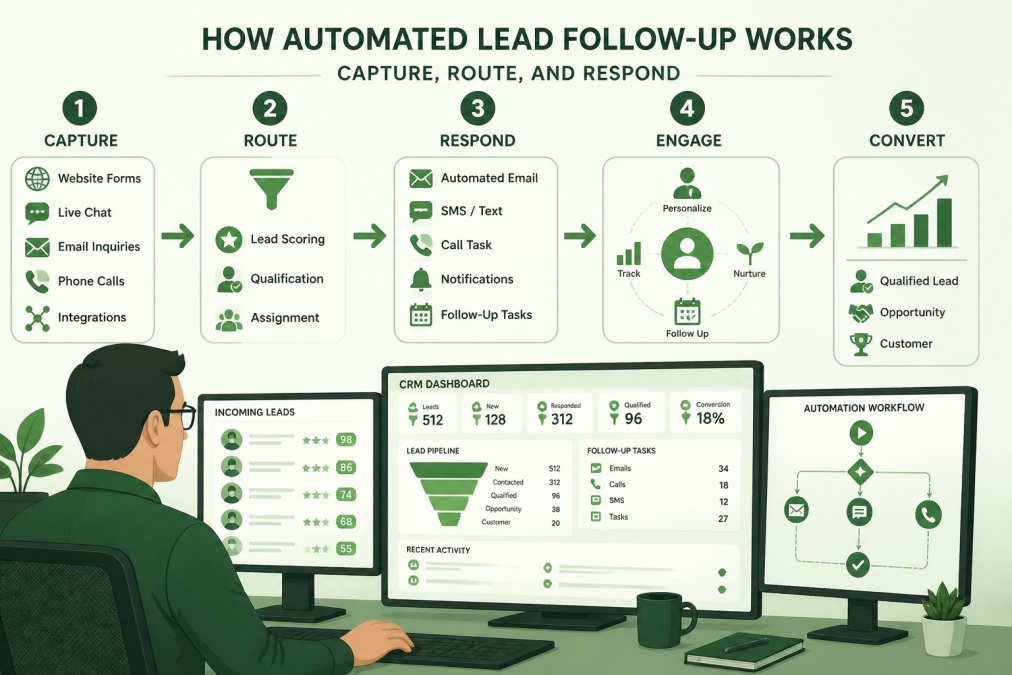
Capture happens when a lead enters through a web form, phone call, email, or meeting request.
Routing assigns leads by rules you define: enterprise prospects to your senior rep, small business inquiries to a junior rep, technical questions to your product team.
Response is the automated email or SMS confirming receipt and setting expectations. A quick acknowledgment signals you're responsive; a delayed or generic one suggests the opposite.
Top Automated Lead Follow-Up Tools Compared
These tools handle different parts of the workflow. Your choice depends on what you're automating and what systems you already use.
| Tool | Best For | Key Strength | Free Tier |
|---|---|---|---|
| Pipedrive | CRM-based lead tracking | Pipeline visibility and follow-up automation | Limited free plan |
| Apollo.io | Email sequences and outreach | Engagement tracking and follow-up recommendations | Yes, limited |
| Zapier | Cross-tool automation | Connecting lead capture to any tool in your stack | Yes, limited |
| Calendly | Meeting scheduling | Converting leads to booked calls | Yes, generous |
| Clay | Lead list building | Sourcing and enriching prospect lists | Yes, limited |
| Hunter | Email verification and outreach | Finding and validating email addresses | Yes, limited |
Pipedrive: CRM-Based Lead Tracking and Follow-Up
Pipedrive combines lead tracking with pipeline management and automated follow-up sequences, triggering emails, task assignments, or status updates when a lead enters.
What doesn't: Automation is solid but less sophisticated than dedicated email platforms; complex branching logic, like different follow-ups based on which link was clicked, hits limitations.
Best for: Sales teams that want their CRM and lead follow-up system to be the same tool.
Apollo.io: Email Sequences and Engagement Analysis
Apollo.io combines lead discovery, email sequences, and engagement tracking. It tracks opens, clicks, and replies, then recommends the next follow-up based on that behavior.
What works: Detailed engagement data shows which prospects opened which emails and clicked which links. If someone opened but didn't click, Apollo suggests a different angle next.
What doesn't: Apollo is optimized for cold, email-first outreach; leads from web forms, phone calls, or chat require integration with other tools.
Best for: Sales and marketing teams running email campaigns who want detailed engagement data and AI-assisted follow-up recommendations.
Zapier: Cross-Tool Lead Capture and Routing
Zapier is the glue between your tools.
What works: It integrates with thousands of tools, so you're not locked into one ecosystem, and setup is visual with no coding.
What doesn't: Automation is reactive, it moves data but doesn't generate insights or decide which follow-up is best. You define the rules; Zapier executes them.
Best for: Teams with a diverse tech stack who need to connect lead capture, routing, and follow-up across multiple platforms without custom development.
Calendly: Meeting Scheduling for Follow-Up Conversion
Calendly lets captured leads book a meeting directly from your email or landing page, removing friction from the conversion step.
What works: The free plan includes unlimited one-on-one meetings, and paid plans start at $10 per user per month billed annually. A prospect clicks your link, sees availability, and books in seconds.
What doesn't: It handles scheduling only; you still need another tool for sequences, engagement tracking, or routing.
Best for: Any team that needs to convert leads into meetings. Pair it with an email or CRM tool for a complete workflow.
Clay: Lead List Building for Outreach
Clay is a lead research and enrichment platform for building prospect lists, verifying contact information, and adding company and role context, the foundation for effective outreach.
What works: It pulls data from multiple sources into a single record.
What doesn't: It doesn't automate sequences or manage conversations, it's a data tool, not a messaging platform. Build your list, then move leads to another tool for outreach.
Best for: Teams that need to research and build targeted prospect lists before launching outreach campaigns.
Hunter: Email Verification and Outreach Support
Hunter finds email addresses for prospects and verifies their accuracy.
What works: Email verification is accurate and fast. Hunter checks if an email is likely to be valid before you send. This protects your sender reputation by reducing bounces.
What doesn't: Hunter is a data tool, not an automation platform. It doesn't manage sequences or track engagement.
Best for: Teams that need to find accurate email addresses for prospects and want to reduce bounce rates in their outreach campaigns.
Sales Follow-Up Email Templates That Drive Response
The first follow-up email sets the tone.
Template 1: Quick Acknowledgment
Subject: We Got Your Inquiry, Here's What's Next
Hi [First Name],
Thanks for reaching out.
In the meantime, here's a [resource] that might be helpful: [link].
Looking forward to connecting.
Best, [Your Name]
Template 2: Value-First Response
Subject: One Thing You Should Know About [Their Challenge]
Hi [First Name],
Thanks for getting in touch about [their stated need].
Quick insight: [specific tip or statistic relevant to their situation].
I'd like to schedule 15 minutes to discuss how this applies to your situation.
Best, [Your Name]
Template 3: Soft Handoff
Subject: Connecting You With Our [Specialist/Team]
Hi [First Name],
Thanks for reaching out.
[Rep Name] will reach out within 24 hours to schedule a time that works for you.
Best, [Your Name]
These templates work because they're fast, they assume nothing, and they move the conversation forward.
Lead Response Time Best Practices and Benchmarks
Speed matters more than you might think.
The best practice is to respond to every inbound lead within 1 hour, ideally within 15 minutes.
For cold outreach, emails you're sending to prospects who didn't request contact, the dynamic is different. These leads aren't warm yet.
The key distinction: respond to inbound leads fast. Space out cold outreach over time.
Many businesses find that moving from a 24-hour response time to a 1-hour response time increases meeting bookings by 20-30%.
Track your own response times. Most CRMs can report this.
Setting Up Automated Email Follow-Up: Workflow Triggers and Rules
A workflow trigger is an event that starts an automated action. "When a lead is created, send welcome email" is a trigger-and-action pair.
Start simple. Define 3-5 core triggers:
- New Lead Created → Send welcome email + create task for assigned rep
- No Response in 3 Days → Send follow-up email with different angle
- Lead Moved to Negotiation → Send contract template + schedule follow-up call
- Meeting Scheduled → Send calendar invite + prep materials
- Deal Won → Send thank-you email + onboarding checklist
Each trigger should have a single, clear action. Avoid creating workflows with 10 steps, they get brittle and hard to debug.
The rules that determine routing are equally important. You might route based on:
- Lead source (web form, phone, referral) → different team
- Company size (under $10M revenue, $10-100M, over $100M) → different rep tier
- Industry (tech, healthcare, manufacturing) → specialized sales rep
- Product interest (product A, product B, both) → product specialist
Define these rules in writing before you set them up in your system.
Test your triggers with a small group of leads first. Make sure the emails land in inboxes, the routing works, and the follow-up timing feels natural.
Lead Scoring, Assignment, and Routing Governance
Lead scoring ranks prospects by likelihood to buy.
A basic scoring model assigns points for actions:
- Visited pricing page: +10 points
- Downloaded case study: +15 points
- Opened email: +5 points
- Clicked link in email: +10 points
- Attended webinar: +20 points
- Requested demo: +50 points
Set a threshold, say, 40 points, and leads above it get routed to sales. Leads below it stay in nurture sequences until they accumulate more points.
Routing governance means defining who gets which leads. You might assign:
- Leads from existing customers → account manager
- Leads from target accounts → senior sales rep
- Leads from other companies → junior sales rep
- Leads from non-target industries → nurture sequence
Document these rules. New team members need to understand why leads are routed the way they are. Without documentation, routing decisions become inconsistent and leads get mishandled.
Review your scoring and routing quarterly. Which leads actually convert? Adjust your scoring model to reflect that. If a certain type of lead consistently converts, increase its score.
Privacy, Consent, and Deliverability Safeguards
Automated follow-up systems must respect privacy laws and maintain sender reputation. Two key areas: consent and deliverability.
Consent means the prospect agreed to receive your messages.
Deliverability is whether your emails land in inboxes or spam folders. High bounce rates, spam complaints, and sending to inactive addresses damage your sender reputation.
Monitor your metrics:
- Bounce rate: Should be under 2%. High bounces signal bad data or list quality issues.
- Spam complaint rate: Should be under 0.1%. High complaints mean your message isn't resonating or people don't remember opting in.
- Unsubscribe rate: 0.2-0.5% is normal. Higher rates suggest your frequency is too high or your content isn't relevant.
Many businesses find that maintaining clean lists and respecting consent actually improves results.
Automated lead follow-up systems eliminate the guesswork from sales operations.
The tools above handle different pieces of this workflow. Pipedrive works for teams that live in their CRM. Apollo.io works for email-first outreach.
At Upgrade My Business, we help companies implement systems like these as part of larger operational scaling. Whether you're automating lead follow-up, modernizing your tech stack, or restructuring your sales process, the principles are the same: eliminate manual work, reduce response time, and route leads to the right person. Learn more about sales automation best practices and how leading teams structure their workflows.
Frequently Asked Questions
How do you automate lead follow-ups without losing the personal touch?
Automated lead follow-up systems use workflow triggers to send timely initial responses, then route leads to your sales team for personalized outreach. The automation handles speed and consistency, getting back to prospects within minutes, while your team handles relationship building. Many systems let you set rules so only truly qualified leads trigger automation, keeping your team focused on high-value conversations rather than chasing every inquiry.
What's a realistic lead response time for automated systems?
Industry lead response time best practices show that responding within 5 minutes significantly increases conversion rates. Automated systems can achieve this by triggering instant acknowledgment emails when leads submit forms or calls come in. For more complex inquiries, automation routes leads to available team members based on skill or territory. Even when your team is unavailable, an automated response sets expectations and captures contact information, preventing lost leads during off-hours.
Which automated email follow-up approach works best for small teams?
For small teams, the most effective automated email follow-up combines a CRM like Pipedrive with basic email sequences. Start with three to five touchpoints: initial acknowledgment, value proposition, social proof, and call-to-action. Automate the timing so emails go out at optimal intervals (typically 1 hour, 24 hours, 3 days, 7 days) without requiring manual sending. This keeps your team from dropping follow-ups while staying manageable to maintain and adjust based on what works.
Do automated lead follow-up systems work with our existing CRM?
Most modern automated lead follow-up software integrates with major CRMs through native connectors or platforms like Zapier. Before choosing a tool, verify it supports your specific CRM and any custom fields you rely on. Some systems like Pipedrive have follow-up automation built in, while others like Zapier require setup but offer more flexibility. Ask vendors about integration time and whether your CRM's data structure will need changes, this affects implementation timeline and team adoption.